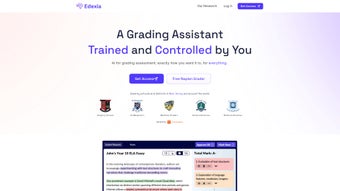

Download Edexia – AI‑Powered Grading Tool for Educators
Educators worldwide are constantly searching for ways to reclaim valuable classroom time while still delivering high‑quality, personalized feedback to students. Edexia answers that call by marrying advanced artificial‑intelligence algorithms with a clean, browser‑based interface designed specifically for teachers, lecturers, and academic administrators. Whether you teach a small seminar or manage hundreds of assessments across multiple courses, Edexia promises to streamline the grading pipeline, reduce bias, and keep you compliant with strict data‑privacy standards. Below you’ll find a deep dive into what makes Edexia stand out, how to get started, and an honest look at its strengths and limitations.
Overview – Transform Your Assessment Workflow
Edexia arrives at a pivotal moment for education professionals who juggle lesson planning, classroom management, and the relentless demand for rapid, detailed feedback. Built as a fully web‑based application, the platform eliminates the need for heavyweight installations and runs on any modern browser, ensuring that schools can adopt it without costly IT upgrades. At its core, Edexia leverages a sophisticated natural‑language processing (NLP) engine that has been trained on thousands of graded responses across disciplines—from humanities essays to computer‑science code snippets. This AI engine can automatically interpret student answers, apply a pre‑defined rubric, and generate a numeric score alongside nuanced, human‑like commentary.
The dashboard presents a holistic view of all active classes, upcoming assignments, and real‑time grading progress. Teachers can monitor submission rates, spot students who may be falling behind, and export grade books with a single click. Because the AI continuously learns from teacher corrections, its accuracy improves over time, aligning more closely with institutional grading standards. Edexia also prioritizes fairness: every student’s work is evaluated against the exact same rubric, dramatically reducing inadvertent bias that can creep into manual marking.
Integration is another cornerstone of the platform. Edexia syncs effortlessly with popular learning management systems (LMS) such as Canvas, Moodle, Blackboard, and Google Classroom. This means grades and feedback can be pushed directly into existing gradebooks, eliminating duplicate data entry. Security is baked in; all data is encrypted in transit (TLS 1.3) and at rest, meeting FERPA, GDPR, and other regional compliance requirements. In short, Edexia offers a secure, scalable, and teacher‑friendly environment that modernizes grading without demanding technical expertise.
Key Features that Set Edexia Apart
Edexia’s feature set has been carefully crafted to address the most time‑consuming aspects of assessment while providing flexibility for diverse instructional needs. Below is an expanded look at each capability, complete with real‑world examples of how they can be applied in daily teaching practice.
- AI‑Driven Automatic Grading: The engine evaluates essays, short answers, and even code by understanding context, grammar, and logical flow. For instance, a literature professor can upload a batch of 200 essays, and the AI will assign scores based on thesis clarity, argument development, and textual evidence.
- Bulk Upload & Bulk Grading: Teachers drag‑and‑drop CSV, PDF, or DOCX files containing student responses. The platform parses each file, extracts student identifiers, and grades them in seconds—saving up to 80 % of manual effort for large classes.
- Customizable Rubrics: While Edexia ships with pre‑trained rubrics for common subjects, educators can edit weightings, add new criteria, or build rubrics from scratch to match specific learning outcomes. A math instructor, for example, can create separate criteria for problem‑solving method, accuracy, and presentation.
- Detailed Feedback Generator: Beyond a numeric score, the AI crafts personalized comments that highlight strengths, pinpoint weaknesses, and suggest concrete improvement steps. This mirrors the tone of a human grader and encourages student growth.
- Class Dashboard & Analytics: Real‑time visualizations show grading completion percentages, average class performance, and outlier detection. Teachers can quickly identify topics where many students struggled and adjust future instruction accordingly.
- LMS Integration: One‑click synchronization with Canvas, Moodle, Blackboard, and Google Classroom ensures that grades are instantly reflected in the institution’s official records, eliminating duplicate entry.
- Secure Cloud Storage: All assessment data is stored in encrypted cloud containers, with role‑based access controls. Schools retain full audit logs for compliance audits.
- Multi‑Device Access: Because Edexia runs in the browser, it works on Windows 10/11, macOS Ventura+, Linux, iOS 14+, and Android 10+. Teachers can grade on a desktop at school and review feedback on a tablet at home.
- Versioned AI Updates: The underlying model receives monthly enhancements that incorporate the latest linguistic patterns and curriculum changes, ensuring the system stays current without any downtime for the user.
- Support & Training Resources: A comprehensive knowledge base, on‑demand webinars, and live chat support help educators get up to speed quickly and troubleshoot any issues.
Installation, Compatibility, and First‑Time Usage
Since Edexia is a cloud‑native solution, there is no traditional installation process. All you need is a reliable internet connection and a modern browser (Chrome, Firefox, Edge, or Safari). To begin, navigate to the official Edexia portal and click the “Sign Up for Free” button. The registration form requests basic details—full name, institutional affiliation, and a secure password. After confirming your email address, you are greeted by an intuitive onboarding wizard.
Step 1: Create Your First Class. The wizard guides you through naming the class, selecting the term, and adding roster information. You can either import a CSV file exported from your LMS or manually enter student IDs. The system validates the data in real time, flagging duplicates or missing fields.
Step 2: Upload an Assessment. Supported file formats include PDF (for scanned handwritten work), DOCX or plain text (for typed responses), and CSV (for multiple‑choice answer keys). Edexia automatically detects the file type, extracts student identifiers, and matches each answer to the appropriate rubric.
Step 3: Choose or Build a Rubric. You may select a pre‑built rubric from the library or craft a custom one. For custom rubrics, the wizard recommends a “preview grading” mode that lets you test the rubric on a small sample set before applying it to the entire class.
Operating System Compatibility: Because the platform runs entirely in the browser, it is compatible with Windows 10/11, macOS Ventura+, most Linux distributions (Ubuntu, Fedora, etc.), as well as iOS 14+ and Android 10+. The responsive design ensures that the dashboard remains functional on tablets and smartphones, though bulk uploads are most efficient on a desktop with a full‑size keyboard and mouse.
Usage Tips for Maximum Efficiency. Prepare assessment files in the recommended formats, keep rubric criteria concise, and use the “preview grading” feature to verify AI suggestions before finalizing scores. All grading actions are logged, providing a complete audit trail for accreditation bodies. If the AI misinterprets a nuanced response, you can override the score and add a custom comment; the system learns from these corrections to improve future accuracy.
Pros and Cons – An Honest Review
Pros
- Massive time savings – bulk grading reduces manual effort by up to 80 %.
- Consistent, unbiased scoring thanks to AI‑driven rubrics.
- Seamless integration with major LMS platforms eliminates duplicate data entry.
- Secure, cloud‑based storage meets FERPA, GDPR, and other privacy regulations.
- User‑friendly interface requires no technical background, allowing quick adoption.
- Regular AI model updates keep the grading engine current with educational standards.
- Multi‑device accessibility enables grading from any location.
Cons
- Initial learning curve for educators unfamiliar with custom rubric creation.
- Dependence on a stable internet connection; offline grading is not supported.
- AI may occasionally misinterpret nuanced or creative student responses, necessitating manual review.
- Advanced analytics and priority support are locked behind premium plans.
- Large file uploads can be slower on limited bandwidth connections.
Frequently Asked Questions
Below are the most common queries from educators considering Edexia. Each answer is crafted to help you decide whether this AI‑grading solution fits your institution’s needs.
Is Edexia free for teachers?
Yes, Edexia offers a free tier that includes core grading features, unlimited class creation, and LMS integration. Premium plans add advanced analytics, priority support, and larger storage quotas.
How does Edexia ensure data privacy?
All data is encrypted both in transit (TLS 1.3) and at rest. Edexia complies with FERPA, GDPR, and other regional education data standards, and provides export controls for schools.
Can I use Edexia on a mobile device?
Absolutely. The responsive web design works on iOS and Android browsers, allowing teachers to review grades and provide feedback on the go, though bulk uploads are best performed on a desktop.
What types of assessments can Edexia grade?
Edexia supports multiple‑choice tests, short answer questions, essays, coding assignments, and even multimedia projects when paired with rubric criteria that evaluate video reflections or audio submissions.
How often is the AI model updated?
The AI engine receives monthly updates that incorporate new linguistic patterns, curriculum changes, and feedback from the educator community, ensuring continuous improvement.
Conclusion & Call to Action
Edexia represents a significant leap forward in educational technology, turning the traditionally tedious grading process into a streamlined, data‑driven experience. Its AI core, combined with robust security, seamless LMS integration, and a flexible rubric system, makes it a compelling choice for schools of all sizes seeking to boost teacher productivity and deliver timely, constructive feedback to students. While an internet connection and a brief learning period are required, the payoff in saved hours and increased grading consistency is substantial.
Ready to reclaim valuable classroom time and provide your students with the detailed feedback they deserve? Download Edexia today and start a free trial that showcases how intelligent grading can transform your teaching workflow. Experience the future of assessment—secure, efficient, and teacher‑centric.



.png)



